
Ford Explorer
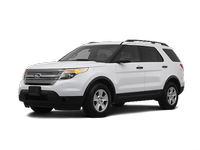
The Ford Explorer is a large three-row SUV that can accommodate up to seven passengers. There are four trim levels: base, XLT, Limited and Sport. Though even the base version comes well-equipped, moving up the list provides luxuries such as leather seating, the Sync voice command system, a rearview camera, keyless ignition/entry and upgraded audio systems. In addition to its potent engine, the Sport trim features a sport-tuned suspension as well as unique interior/exterior trim details.
- Ford Explorer 2011-2026 Owner's Manual
- Introduction
- Child Safety
- Safety Belts
- Personal Safety System
- Supplementary Restraints System
- Keys and Remote Control
- MyKey
- Locks
- Security
- Steering Wheel
- Pedals
- Wipers and Washers
- Lighting
- Windows and Mirrors
- Instrument Cluster
- Information Displays
- Audio System
- Climate Control
- Seats
- Universal Garage Door Opener (If Equipped)
- Auxiliary Power Points
- Storage Compartments
- Starting and Stopping the Engine
- Fuel and Refueling
- Transmission
- Four-Wheel Drive (If Equipped)
- Brakes
- Traction Control
- Stability Control
- Terrain Response
- Parking Aids
- Cruise Control
- Driving Aids
- Load Carrying
- Towing
- Driving Hints
- Roadside Emergencies
- Customer Assistance
- Fuses
- Maintenance
- Vehicle Care
- Wheels and Tires
- Capacities and Specifications
- Accessories
- Ford Extended Service Plan
- Scheduled Maintenance
- SYNC®
- MyFord Touch® (If Equipped)
See also:
Safety seats for children
Infant and/or toddler seats
Use a safety seat that is recommended for the size and weight of the child.
When installing a child safety seat:
• Review and follow the information presented in the ...
AdvanceTrac®
The system automatically activates when you start your engine. The AdvanceTrac®
with RSC® system cannot be completely turned off, but the electronic stability control
and roll stability control ...
Exceptions
There are several exceptions to the Normal Schedule. They are listed below:
Normal vehicle axle maintenance: Rear axles and power take-off (PTO) units with
synthetic fluid and light-duty trucks equ ...