
Introduction
ABOUT THIS MANUAL
Thank you for choosing Ford. We recommend that you take some time to get to know your vehicle by reading this manual. The more that you know about it, the greater the safety and pleasure you will get from driving it.
WARNING: Always drive with due care and attention when using and operating the controls and features on your vehicle.
Note: This manual describes a range of product features and options, sometimes before they are generally available. Therefore, you may find options in this manual that are not found on your vehicle.
Note: Some of the illustrations in this manual may be used for different models, so they may appear different than your vehicle. However, the essential information in the illustrations is always correct.
Note: Always use and operate your vehicle in line with all applicable laws and regulations.
Note: Pass on this manual when selling your vehicle. It is an integral part of the vehicle.
This manual may qualify the location of a component as left-hand side or right-hand side. The side is determined when facing forward in the seat.
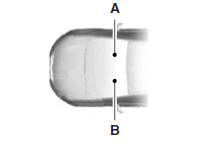
A. Right-hand side
B. Left-hand side
Protecting the Environment

You must play your part in protecting the environment. Correct vehicle usage and the authorized disposal of waste, cleaning and lubrication materials are significant steps toward this aim.
- Symbol glossary
- Data recording
- California proposition 65
- Perchlorate material
- Ford credit (u.S. Only)
- Replacement parts recommendation
- Special notices
- Mobile communications equipment
- Export unique (non–united states/canada) vehiclespecific information
See also:
Lane keeping system
WARNING: The system is designed to aid the driver. It is not intended
to replace the driver’s attention and judgment. The driver is still responsible
to drive with due care and attention.
The s ...
Fuel quality
Note: Use of any fuel other than those recommended may cause powertrain
damage and a loss of vehicle performance; repairs may not be covered under warranty.
Choosing the Right Fuel
Use only UNLEAD ...
Technical specifications
Wheel lug nut torque
WARNING: When a wheel is installed, always remove any corrosion, dirt
or foreign materials present on the mounting surfaces of the wheel or the surface
of the wheel hub, brak ...