
Ford Explorer
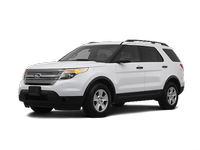
The Ford Explorer is a large three-row SUV that can accommodate up to seven passengers. There are four trim levels: base, XLT, Limited and Sport. Though even the base version comes well-equipped, moving up the list provides luxuries such as leather seating, the Sync voice command system, a rearview camera, keyless ignition/entry and upgraded audio systems. In addition to its potent engine, the Sport trim features a sport-tuned suspension as well as unique interior/exterior trim details.
- Ford Explorer 2011-2026 Owner's Manual
- Introduction
- Child Safety
- Safety Belts
- Personal Safety System
- Supplementary Restraints System
- Keys and Remote Control
- MyKey
- Locks
- Security
- Steering Wheel
- Pedals
- Wipers and Washers
- Lighting
- Windows and Mirrors
- Instrument Cluster
- Information Displays
- Audio System
- Climate Control
- Seats
- Universal Garage Door Opener (If Equipped)
- Auxiliary Power Points
- Storage Compartments
- Starting and Stopping the Engine
- Fuel and Refueling
- Transmission
- Four-Wheel Drive (If Equipped)
- Brakes
- Traction Control
- Stability Control
- Terrain Response
- Parking Aids
- Cruise Control
- Driving Aids
- Load Carrying
- Towing
- Driving Hints
- Roadside Emergencies
- Customer Assistance
- Fuses
- Maintenance
- Vehicle Care
- Wheels and Tires
- Capacities and Specifications
- Accessories
- Ford Extended Service Plan
- Scheduled Maintenance
- SYNC®
- MyFord Touch® (If Equipped)
See also:
Warning lamps and indicators
There indicators can alert you to a vehicle condition that may become serious
enough to cause expensive repairs. Many lights will illuminate when you start your
vehicle to make sure they work. If ...
Ordering Additional Owner’s Literature
To order the publications in this portfolio, contact Helm, Incorporated at:
HELM, INCORPORATED P.O. Box 07150 Detroit, Michigan 48207 Or to order a free
publication catalog, call toll free: 1-800-7 ...
Voice recognition
This system helps you control many features using voice commands. This allows
you to keep your hands on the wheel and focus on what is in front of you. The system
provides feedback through audible ...