
Terrain Response
TERRAIN MANAGEMENT (IF EQUIPPED)
This system optimizes drivability and comfort as well as maximizing traction while operating on different types of terrain.
Turn the control located on the center console to choose between the following modes:
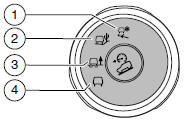
1. Grass/Gravel/Snow mode should be selected where a firm surface is covered with loose or slippery material such as packed snow, ice, water, grass, or a thin layer of gravel or sand. For deep gravel or sand, select Sand mode. If the vehicle cannot gain traction in deep snow, turning off the traction control system may help (turn traction control back on when traction is regained). See the Traction Control chapter.
2. Sand mode should be selected in soft dry sand or deep gravel. If crossing wet sand that may be sufficiently deep enough for the wheels to sink into the surface, select Mud/Ruts mode.
3. Mud/Ruts mode should be selected for muddy, rutted, soft, or uneven terrain.
4. Normal mode is for on-road conditions and should be selected before driving on surfaces which are similar to a hard road surface or once the need for a special mode has passed. Select Normal mode when towing a trailer.
Note: Cruise control is available only in Normal and Snow modes.
Note: The Sand and Mud/Ruts modes are for off-road use only.
Note: The curve control portion of the AdvanceTrac® system is unavailable when Sand or Mud/Ruts is selected.
If the system becomes inoperable, selecting some modes may not be possible and a message is displayed. If it becomes inoperable due to a system malfunction, all of the mode indicators on the control turn off and one of the following messages appears in the information display:
TERRAIN MANAGEMENT SYSTEM FAULT: Cycling the key may clear the fault. If key cycling does not work, have the system serviced by an authorized dealer.
MODE CHANGE NOT ACCEPTED, RETRY: A mode change cannot be made at the time of driver request. Try the mode change again.
See also:
Engine block heater
WARNING: Failure to follow engine block heater instructions could result
in property damage or physical injury.
WARNING: Do not use your heater with ungrounded electrical systems or
two-pronged ( ...
Breaking-in your vehicle
Your vehicle does not need an extensive break-in. Try not to drive continuously
at the same speed for the first 1,000 miles (1,600 km) of new vehicle operation.
Vary your speed frequently in order ...
Engine coolant check
Checking the Engine Coolant
The concentration and level of engine coolant should be checked at the intervals
listed in Scheduled Maintenance Information.
Note: Make sure that the level is between ...