
Steering Wheel
Adjusting the steering wheel
WARNING: Do not adjust the steering wheel when your vehicle is moving.
Note: Make sure that you are sitting in the correct position. See Sitting in the Correct Position in the Seats chapter.
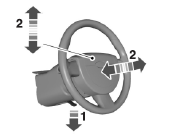
1. Unlock the steering column.
2. Adjust the steering wheel to the desired position.
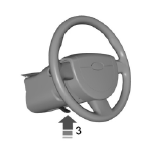
3. Lock the steering column.
Power Tilt and Telescope Steering Column (If Equipped)
WARNING: Do not adjust the steering wheel when your vehicle is moving.
Note: Make sure that you are sitting in the correct position. Refer to Sitting in the Correct Position in the Seats chapter.
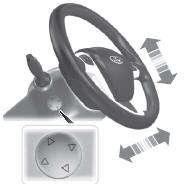
Use the control on the side of the steering column to adjust the position.
To adjust:
• tilt: press the top or bottom of the control
• telescope: press the front or rear of the control.
Easy Entry and Exit Feature
When you switch the ignition off, the steering column will move to the full up and forward position to allow extra room to exit your vehicle. The column will return to the previous setting when you switch the ignition on. You can enable or disable this feature in the information display. See General Information in the Information Displays chapter.
Memory Feature
The steering column position saves when you do a memory set function.
You can recall it with the memory feature. Refer to the Seats chapter.
Pressing the adjustment control during memory recall will cancel the operation. The column will respond to the adjustment control.
The steering column sets a stopping position just short of the end of the column position to prevent damage to the steering column. A new stopping position will be set if the steering column encounters an object while tilting or telescoping.
To reset the steering column to its normal stopping position:
1. Press the steering column control again after encountering the new stopping
position.
2. Continue pressing the control until it reaches the end of the column position.
A new stopping position will be set. The steering column will stop just short of the end of the column position the next time it is tilted or telescoped.
AUDIO CONTROL
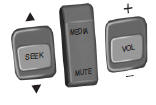
SEEK: Press to select the next or previous stored preset or track.
Press and hold to select the next or previous frequency or seek through a track.
MEDIA: Press repeatedly to scroll through available audio modes.
MUTE: Press to silence the radio.
VOL (Volume): Press to increase or decrease the volume.
VOICE CONTROL (IF EQUIPPED)
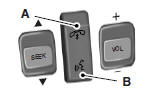
A. Phone mode
B. Voice recognition
See the SYNC or MyFord Touch chapter.
CRUISE CONTROL
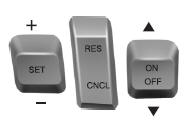
Type 1
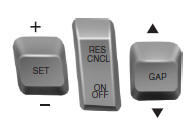
Type 2
See the Cruise Control chapter for information on this feature.
INFORMATION DISPLAY CONTROL
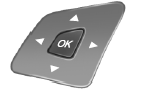
Refer to the Information Displays chapter for more information.
Cluster Display Control Features
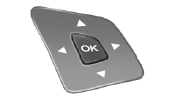
If equipped with:
MyFord system: This control functions the same as the center control on the faceplate. Refer to MyFord system in the Audio Systems chapter.
MyFord Touch: Use this control to adjust the right side of the cluster display. Navigate through the screen and press OK to select. Refer to the MyFord Touch chapter.
HEATED STEERING WHEEL (IF EQUIPPED)
See the MyFord Touch chapter.
See also:
Starting and Stopping the Engine
GENERAL INFORMATION
WARNING: Extended idling at high engine speeds can produce very high temperatures
in the engine and exhaust system, creating the risk of fire or other damage.
WARNING: Do not p ...
Airbag Supplemental Restraint System (SRS)
Important SRS precautions
The SRS is designed to work with the safety belt to help protect the driver and
right front passenger from certain upper body injuries.
Airbags DO NOT inflate slowly; ...
Four-Wheel Drive (If Equipped)
Four wheel drive
The intelligent 4WD system continuously monitors vehicle conditions and automatically
adjusts the power distribution between the front and rear wheels. It combines transparent
al ...