
Seats
Sitting in the correct position
WARNING: Sitting improperly out of position or with the seat back reclined too far can take off weight from the seat cushion and affect the decision of the passenger sensing system, resulting in serious injury or death in a crash. Always sit upright against your seat back, with your feet on the floor.
WARNING: Do not recline the seat back as this can cause the occupant to slide under the seat’s safety belt, resulting in severe personal injury in the event of a crash.
WARNING: Do not place objects higher than the seat backs to reduce the risk of injury in a crash or during heavy braking or when stopping suddenly.
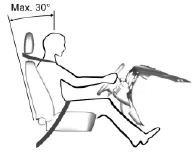
When you use them properly, the seat, head restraint, safety belt and airbags will provide optimum protection in the event of a crash.
We recommend that you follow these guidelines:
• Do not recline the seat back more than 30 degrees from vertical.
• Sit in an upright position with the base of your spine as far back as possible.
• Adjust the head restraint so that the top of it is level with the top of your
head and as far forward as possible, remaining comfortable.
• Keep sufficient distance between yourself and the steering wheel. We recommend
a minimum of 10 inches (250 millimeters) between your breastbone and the airbag
cover.
• Hold the steering wheel with your arms slightly bent.
• Bend your legs slightly so that you can press the pedals fully.
• Position the shoulder strap of the safety belt over the center of your shoulder
and position the lap strap tightly across your hips.
Make sure that your driving position is comfortable and that you can maintain full control of your vehicle.
See also:
SecuriCode™ keyless entry keypad
You can use the keypad to:
• lock or unlock the doors
• recall memory features (if equipped)
• enable and disable autolock and autounlock
• program and erase user codes
• arm and disa ...
Roadside Emergencies
Getting roadside assistance
Vehicles Sold in the U.S.: Getting Roadside Assistance
To fully assist you should you have a vehicle concern, Ford Motor Company offers
a complimentary roadside assista ...
Information messages
Note: Depending on the vehicle options equipped with your vehicle, not
all of the messages will display or be available. Certain messages may be abbreviated
or shortened depending upon which clust ...