
Using cruise control
WARNING: Do not use cruise control in heavy traffic or on roads that are winding, slippery or unpaved.
Note: Vehicle speed may vary momentarily when driving up or down a steep hill. Apply the brakes if your vehicle speed increases above the set speed while driving downhill.
Note: Cruise control will disengage if your vehicle speed decreases more than 10 mph (16 km/h) below your set speed while driving uphill.
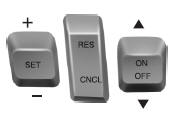
The cruise controls are located on the steering wheel.
Switching Cruise Control On
Press the ON control up and release.

The indicator will appear in the instrument cluster.
Setting a Speed
1. Accelerate to the desired speed.
2. Press the SET control upward and release.
3. Take your foot off the accelerator pedal.
The indicator will change colors in the instrument cluster.
Changing the Set Speed
Note: If you accelerate by pressing the accelerator pedal, the set speed will not change. When you release the accelerator pedal, you will return to the speed that you previously set.
• Press SET up or down and hold to increase or decrease the set speed.
Release the control when you reach the desired speed.
• Press SET up or down and release. The set speed will change in approximately 1
mph (2 km/h) increments.
• Press the accelerator pedal or brake pedal until you reach the desired speed.
Press SET up and release.
Canceling the Set Speed
Press CNCL or tap the brake pedal. The set speed will not be erased.
Resuming the Set Speed
Press and release RES.
Switching Cruise Control Off
Note: The set speed is erased when you switch off cruise control.
Press the OFF control down and release or turn off the ignition.
See also:
Audible warnings and indicators
Key In Ignition Warning Chime
Sounds when the key is left in the ignition in the off or accessory position
and the driver’s door is opened.
Keyless Warning Alert (If Equipped)
Sounds when the k ...
Opening and closing the hood
1. Inside the vehicle, pull the hood release handle located under the bottom
of the instrument panel near the steering column.
2. Go to the front of the vehicle and release the secondary hood l ...
Roadside Emergencies
Getting roadside assistance
Vehicles Sold in the U.S. : Getting Roadside Assistance
To fully assist you should you have a vehicle concern, Ford Motor Company offers
a complimentary roadside assi ...