
Direction indicators
The turn signal lever does not mechanically lock in the upward or downward position when activated. The turn signal control activation and cancellation is electronic.
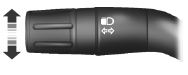
• Push down to activate the left turn signal.
• Push up to activate the right turn signal.
• Push the lever again in either direction to manually cancel turn signal operation.
Note: Tap the lever up or down to make the direction indicators flash only three times to indicate a lane change.
See also:
Child seat positioning
WARNING: Airbags can kill or injure a child in a child seat.
NEVER place a rear-facing child seat in front of an active airbag.
If you must use a forward-facing child seat in the front seat, move th ...
Running out of fuel
If you have run out of fuel and need to refill the vehicle with a portable fuel
container, see Running out of fuel in the Maintenance and Specifications chapter
for proper fuel filling method usin ...
Cruise Control
PRINCIPLES OF OPERATION
Cruise control lets you maintain a set speed without keeping your foot on the
accelerator pedal. ...