
USB port
WARNING: Driving while distracted can result in loss of vehicle control, accident and injury. Ford strongly recommends that you use extreme caution when using any device or feature that may take your focus off the road. Your primary responsibility is the safe operation of your vehicle. We recommend against the use of any handheld device while driving, encourage the use of voice-operated systems when possible and that you become aware of applicable state and local laws that may affect use of electronic devices while driving.
The USB port is located in the center console. It allows you to plug in media playing devices, memory sticks and charge devices (if supported).
See the SYNC chapter for more information.
MEDIA HUB (IF EQUIPPED)
The media hub is located in the center console and has the following features:
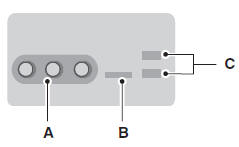
A. A/V inputs
B. SD card slot
C. USB ports
For more information, see the MyFord Touch chapter.
See also:
Phone features
Hands-free calling is one of the main features of SYNC®. Once you pair your phone,
you can access many options using the touchscreen or voice commands. While the system
supports a variety of feat ...
Customer Assistance
GETTING THE SERVICES YOU NEED
Warranty repairs to your vehicle must be performed by an authorized dealer. While
any authorized dealer handling your vehicle line will provide warranty service,
we ...
Bulb Replacement
Lamp assembly condensation
Exterior lamps are vented to accommodate normal changes in pressure.
Condensation can be a natural by-product of this design. When moist air enters
the lamp assembly t ...