
Floor mats
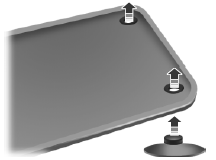
WARNING: Always use floor mats that are designed to fit the footwell of your vehicle. Only use floor mats that leave the pedal area unobstructed. Only use floor mats that are firmly secured to retention posts so that they cannot slip out of position and interfere with the pedals or impair safe operation of your vehicle in other ways.
• Pedals that cannot move freely can cause loss of vehicle control and increase
the risk of serious personal injury.
• Always make sure that the floor mats are properly attached to the retention posts
in the carpet that are supplied with your vehicle.
Floor mats must be properly secured to both retention posts to ensure mats do
not shift out of position.
• Never place floor mats or any other covering in the vehicle footwell that cannot
be properly secured to prevent them from moving and interfering with the pedals
or the ability to control the vehicle.
• Never place floor mats or any other covering on top of already installed floor
mats. Floor mats should always rest on top of the vehicle carpeting surface and
not another floor mat or other covering. Additional floor mats or any other covering
will reduce the pedal clearance and potentially interfere with pedal operation.
• Check attachment of floor mats on a regular basis. Always properly reinstall and
secure floor mats that have been removed for cleaning or replacement.
• Always make sure that objects cannot fall into the driver footwell while the vehicle
is moving. Objects that are loose can become trapped under the pedals causing a
loss of vehicle control.
• Failure to properly follow floor mat installation or attachment instructions can
potentially cause interference with pedal operation causing loss of control of vehicle.
• To install floor mats, position the floor mat so that the eyelet is over the retention
post and press down to lock in.
• To remove the floor mat, reverse the installation procedure.
See also:
Engine block heater (if equipped)
WARNING:
Failure to follow engine block heater instructions could result in property damage
or physical injury.
WARNING:
To reduce the risk of electrical shock, do not use your heater with un ...
Mobile communications equipment
Using mobile communications equipment is becoming increasingly important in the
conduct of business and personal affairs. However, you must not compromise your
own or others’ safety when using s ...
Fuse specification chart
Power Distribution Box
WARNING: Always disconnect the battery before servicing high current fuses.
WARNING: To reduce risk of electrical shock, always replace the cover
to the power distribution b ...