
USB port
WARNING: Driving while distracted can result in loss of vehicle control, crash and injury. We strongly recommend that you use extreme caution when using any device that may take your focus off the road. Your primary responsibility is the safe operation of your vehicle. We recommend against the use of any hand-held device while driving and encourage the use of voice-operated systems when possible.
Make sure you are aware of all applicable local laws that may affect the use of electronic devices while driving.
The USB port is located in the center console. It allows you to plug in media playing devices, memory sticks and charge devices (if supported).
See the SYNC chapter for more information.
MEDIA HUB (IF EQUIPPED)
The media hub is located in the center console and has the following features:
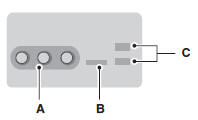
A. A/V inputs
B. SD card slot
C. USB ports
For more information, see the MyFord Touch chapter.
See also:
Utilizing The Mediation/Arbitration Program (Canada only)
For vehicles delivered to authorized Canadian dealers. In those cases where you
continue to feel that the efforts by Ford of Canada and the authorized dealer to
resolve a factory-related vehicle s ...
Cleaning the exterior
Wash your vehicle regularly with cool or lukewarm water and a neutral pH shampoo,
such as Motorcraft® Detail Wash.
• Never use strong household detergents or soap, such as dish washing or laundr ...
Wheels and Tires
GENERAL INFORMATION
Important Information for P265/40R22 Low-profile Tires and Wheels
Note: Your vehicle’s warranty does not cover these types of damage.
Tires should always be kept at the correc ...