
Direction indicators
The turn signal lever does not mechanically lock in the upward or downward position when activated. The turn signal control activation and cancellation is electronic.
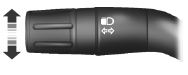
• Push down to activate the left turn signal.
• Push up to activate the right turn signal.
• Push the lever again in either direction to manually cancel turn signal operation.
Note: Tap the lever up or down to make the direction indicators flash only three times to indicate a lane change.
See also:
Replacement parts recommendation
Your vehicle has been built to the highest standards using quality parts.
We recommend that you demand the use of genuine Ford and Motorcraft parts whenever
your vehicle requires scheduled maintena ...
Airbag disposal
Contact your authorized dealer as soon as possible. Airbags MUST BE disposed
of by qualified personnel. ...
Load Carrying
Cargo net
WARNING: This net is not designed to restrain objects during a collision
or heavy braking.
The cargo net secures lightweight objects in the cargo area.
Attach the net to the anchors pro ...