
Troubleshooting
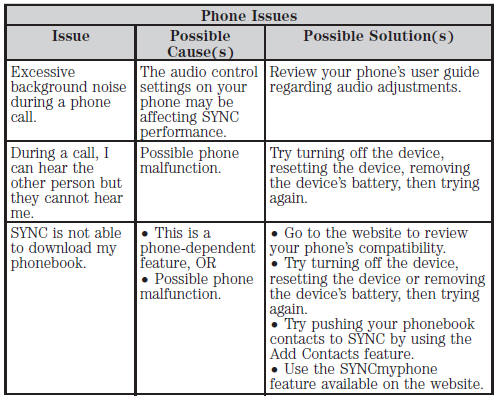
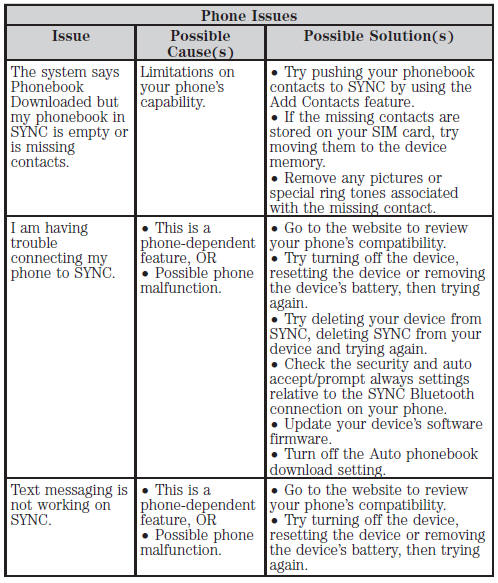
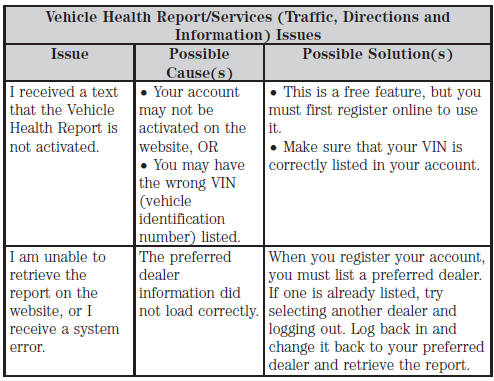
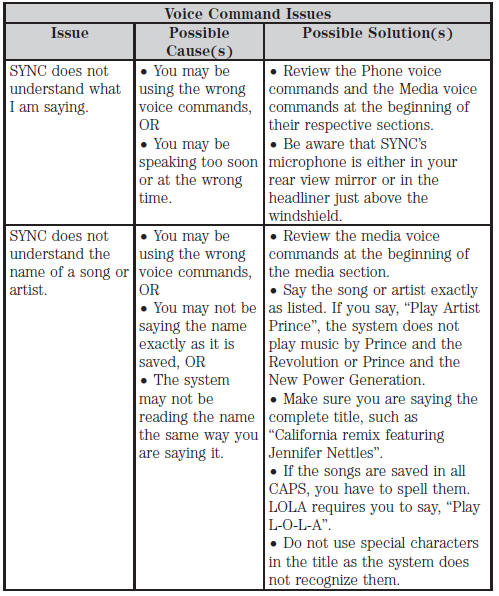
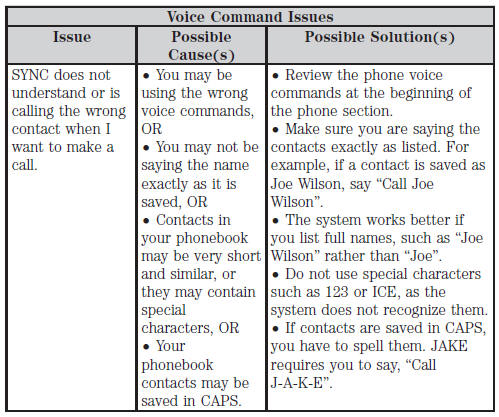
Your SYNC system is easy to use. However, should questions arise, see the tables below.
Use the website at any time to check your phone’s compatibility, register your account and set preferences as well as access a customer representative via an online chat (during certain hours). Visit www.SYNCMyRide.com, www.SYNCMyRide.ca or www.syncmaroute.ca for more information.



See also:
Pairing your phone for the first time
Note: SYNC can support downloading up to approximately 2000 entries per
Bluetooth-enabled cellular phone.
Note: Make sure the vehicle ignition and radio are turned on and the transmission
is in p ...
Recreational towing
Follow these guidelines for your specific powertrain combination to tow your
vehicle for personal travel (such as behind a motor home or a truck).
Note: Put your climate control system in recircula ...
Fuses and relays
Fuses
If electrical components in the vehicle are not working, a fuse may have blown.
Blown fuses are identified by a broken wire within the fuse. Check the appropriate
fuses before replacing a ...