
Instrument Cluster
Gauges
Type 1
Cluster shown in standard measure – metric clusters similar.
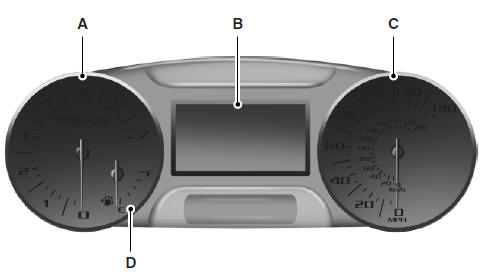
A. Tachometer
B. Information display. See Information displays for more information.
C. Speedometer
D. Fuel gauge
Fuel Gauge
Indicates approximately how much fuel is left in the fuel tank (when the ignition is on). The fuel gauge may vary slightly when the vehicle is in motion or on a grade. The fuel icon and arrow indicates which side of the vehicle the fuel filler door is located.
Type 2
Cluster shown in standard measure – metric clusters similar.
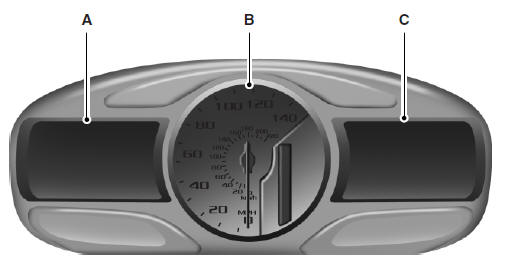
A. Information display. See Information displays for more information.
B. Speedometer
C. Infotainment display. See MyFord Touch® for more information.
See also:
Turn signal control
• Push down to activate the left turn signal.
• Push up to activate the right turn signal.
...
Gauges
Base instrument cluster shown in standard measure. Metric similar.
Optional instrument cluster shown in standard measure. Metric similar.
Speedometer: Indicates the current vehicle speed.
Eng ...
Child restraint and safety belt maintenance
Inspect the vehicle safety belts and child safety seat systems periodically to
make sure they work properly and are not damaged. Inspect the vehicle and child
seat safety belts to make sure there ...