
Ford Explorer
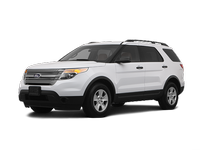
The Ford Explorer is a large three-row SUV that can accommodate up to seven passengers. There are four trim levels: base, XLT, Limited and Sport. Though even the base version comes well-equipped, moving up the list provides luxuries such as leather seating, the Sync voice command system, a rearview camera, keyless ignition/entry and upgraded audio systems. In addition to its potent engine, the Sport trim features a sport-tuned suspension as well as unique interior/exterior trim details.
- Ford Explorer 2011-2026 Owner's Manual
- Introduction
- Child Safety
- Safety Belts
- Personal Safety System
- Supplementary Restraints System
- Keys and Remote Control
- MyKey
- Locks
- Security
- Steering Wheel
- Pedals
- Wipers and Washers
- Lighting
- Windows and Mirrors
- Instrument Cluster
- Information Displays
- Audio System
- Climate Control
- Seats
- Universal Garage Door Opener (If Equipped)
- Auxiliary Power Points
- Storage Compartments
- Starting and Stopping the Engine
- Fuel and Refueling
- Transmission
- Four-Wheel Drive (If Equipped)
- Brakes
- Traction Control
- Stability Control
- Terrain Response
- Parking Aids
- Cruise Control
- Driving Aids
- Load Carrying
- Towing
- Driving Hints
- Roadside Emergencies
- Customer Assistance
- Fuses
- Maintenance
- Vehicle Care
- Wheels and Tires
- Capacities and Specifications
- Accessories
- Ford Extended Service Plan
- Scheduled Maintenance
- SYNC®
- MyFord Touch® (If Equipped)
See also:
Mobile communications equipment
Using mobile communications equipment is becoming increasingly important in the
conduct of business and personal affairs. However, you must not compromise your
own or others’ safety when using s ...
Blind Spot Information System (BLIS) with Cross Traffic Alert(CTA)
WARNING: To help avoid injuries, NEVER use the BLIS® as a replacement
for using the interior and exterior mirrors and looking over your shoulder before
changing lanes. BLIS® is not a replacement ...
Maintenance
General information
Have your vehicle serviced regularly to help maintain its roadworthiness and
resale value. There is a large network of Ford authorized dealers that are there
to help you with ...